
Web Player
Full player bidding
Use this implementation if you want to do minimal coding and let the player handle all your bidding functionality.
All that needs to be done is to set up your prebid params inside the player settings area and let the player do the rest.
Example of player settings area for this type of prebid implementation:
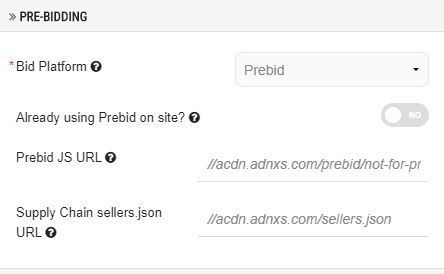
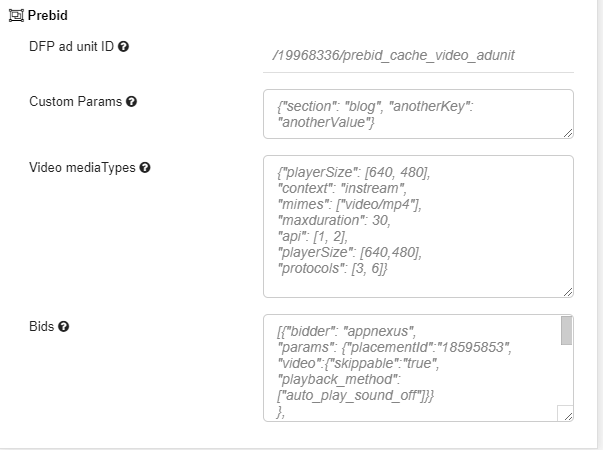
Option | Description |
|---|---|
Bid Platform | Make sure this is set to Prebid |
Already using prebid on site? | Make sure this option is off |
Prebid JS URL | This is the URL you create on prebid.org for your specific use case |
Sellers.json URL | This is the URL pointing to your sellers.json |
DFP ad unit ID | This is the ad unit you will be using in DFP which is intergrated with prebid |
Custom params | Set up custom targeting values here in an object |
Video media types | Set up media types as some of the bidders require this, e.g. Rubicon |
Bids | Set up your bidder array, each in an object of itself |
Once this is set up, all you need to do is grab an embed code for a video or playlist using this player and paste it to your site.
You can further configure and add some custom parameters to your Prebid by adding them to your page:
var prebidConfigTargetvideo = {};			// will be set using pbjs.setConfig();
var prebidAnalyticsConfigTargetvideo = [];		// will be set using pbjs.enableAnalytics();
var bidderSettingsTargetvideo = {};			// will be set to pbjs.bidderSettings();
The player will automatically read these configuration parameters from your page and use them when it starts the bidding process. If you have any Prebid extension installed inside your browser, this implementation may not work due to potential conflicts so please have this in mind.