
Content Management
Webhooks
Get real time notifications about your assets without using the API or logging into the CMS.
Webhooks allow you to receive real time notifications about the events that happen in TargetVideo video library.
Webhooks are designed in a way that will allow you to get real time information when video encoding process is finished, once the video is ready to be used/embedded, if the video is added/removed within a playlist and many more events. Using webhooks you will be able to perform custom actions based on the events that our system will provide.
❗ Important
Webhooks are available on premium plans only. If you are not on a premium plan, contact support@target-video.com to have them enabled.
Webhook setup
Once webhooks are enabled for your account, you can set them up in your website’s settings in TargetVideo.
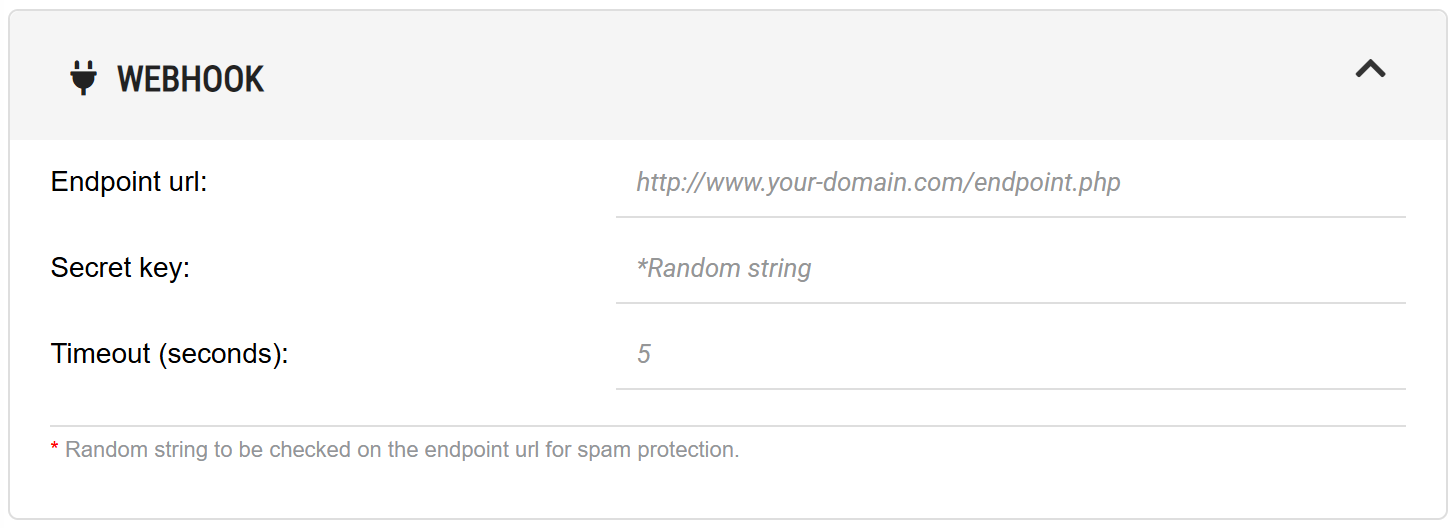
Name | Description |
|---|---|
Endpoint url | The URL each webhook is sent to, as an HTTP |
Secret key | A string you choose. It is sent in every payload as |
Timeout | How long we wait for your endpoint, in seconds. It covers connecting and the whole request. Default |
Events
Use the event field to tell events apart. Older events also send a legacy method field, shown in the second column; method and data are deprecated, so don’t build on them.
Event | Legacy method | Fired when |
|---|---|---|
|
| A video is added to your website. |
|
| A video is edited. |
|
| A video is deleted. |
|
| A video reaches its kill date. |
|
| A video is marked as rejected. |
|
| The SD rendition has been created. Every video gets one. |
|
| Encoding has finished and all renditions are created. |
| — | Encoding failed — for example, the source file is invalid. |
| — | A video’s snapshot images have been created or replaced. |
| — | A livestream recording has been saved as a video. |
|
| A playlist is created. |
|
| A playlist is edited. |
|
| Videos are added to a playlist. |
| — | A video is added to a playlist automatically, because of its tags. |
|
| Videos are removed from a playlist. |
|
| The order of the videos in a playlist changes. |
| — | A livestream channel is added to your website. |
| — | A livestream channel is edited. |
| — | A livestream channel is deleted. |
| — | A schedule is added to a livestream channel. |
| — | A livestream schedule is edited. |
| — | A livestream schedule is deleted. |
Other parts of the platform send events too, named the same way — for example player_edit, unit_add or player_delete.
Request format
Each webhook is an HTTP POST with a multipart/form-data body. The body has a single field, data, holding the event as a JSON string. The body itself is not JSON — read the data field and decode it.
The decoded object contains event, scope (where in the platform the event was raised), response (the affected records, e.g. Video.id), api (true if the change was made through the API, false if in the CMS), timestamp (Unix time) and secret. The snapshot and tag-based add_videos_to_playlist events put the records at the top level instead of under response. This is the decoded data of an sd_encoded event:
{
   "response":{
      "Video":{
         "id":"734392"
      },
      "EncodingStatus":{
         "track_all":"1",
         "sd":"1",
         "ld":"0",
         "hsd":"0",
         "hd":"1",
         "fhd":"1",
         "streaming":"1",
         "snapshot":"1",
         "thumb":"1",
         "vtt":"1",
         "webp":"1",
         "ogg":"1",
         "mp3":"1"
      },
      "invoked_by":"MediaConvert"
   },
   "event":"sd_encoded",
   "scope":"Controller.Encodings",
   "method":"sd_encoded",
   "data":{
      "Video":{
         "id":"734392",
         "encoded":{
            "track_all":"1",
            "sd":"1",
            "ld":"0",
            "hsd":"0",
            "hd":"1",
            "fhd":"1",
            "streaming":"1",
            "snapshot":"1",
            "thumb":"1",
            "vtt":"1",
            "webp":"1",
            "ogg":"1",
            "mp3":"1"
         }
      },
      "invoked_by":"MediaConvert"
   },
   "api":false,
   "warning":"Properties \"data\" and \"method\" will be deprecated at 1.1.2021. Please use \"response\" and \"event\" properties instead.",
   "timestamp":1614908944,
   "secret":"your_secret_key"
}
Receiving a webhook
Respond with any 2xx status within the timeout, and do slow work after responding. A minimal receiver in PHP:
$payload = json_decode($_POST['data'] ?? '', true);

// Reject anything that doesn't carry your secret key
if (!is_array($payload) || !hash_equals('YOUR_SECRET_KEY', (string)($payload['secret'] ?? ''))) {
    http_response_code(403);
    exit;
}

switch ($payload['event']) {
    case 'video_encoded':
        $videoId = $payload['response']['Video']['id'];
        // the video is ready: queue your own processing here
        break;
    case 'error':
        $videoId = $payload['response']['Video']['id'];
        // encoding failed: alert someone
        break;
}

http_response_code(200);
Delivery and retries
A delivery fails if your endpoint can’t be reached, doesn’t answer within the timeout, or returns a 4xx or 5xx status. A failed webhook is retried up to four more times — about 1, 5, 15 and 60 minutes after the first failure — and then dropped. A retry can repeat an event your endpoint already handled (for example, if it answered too slowly), so make your handler safe to run twice for the same event.
Things to know when you build your receiver:
A retry is an exact copy. It sends the same
dataas the first attempt, with the sametimestamp. To spot duplicates, compareevent,timestampand the record IDs inresponse.Order isn’t guaranteed. A retried event can arrive after newer events for the same video. Before acting on an event, check the record’s current state through the API.
A 3xx reply counts as delivered. Redirects aren’t followed, so an endpoint that redirects (for example from http to https) loses the event without any retry.
Retries go to the old address. A retry uses the endpoint URL, secret key and timeout that were set when the delivery first failed. If you change the endpoint, retries already queued still go to the old URL.
If your endpoint is down for more than about an hour, the events from that time are not sent again. To catch up, use the API to fetch the changes.